
Crawl errors are one of the most common technical SEO issues that can hold back your website from ranking higher in search engines. When Googlebot or other crawlers fail to access your pages correctly, it impacts your website indexing, reduces organic traffic, and can even waste your crawl budget.
In this complete step-by-step guide, we’ll cover:
- What crawl errors are
- Different types of crawl errors (404, DNS, server, redirect, etc.)
- How crawl errors affect SEO and indexing
- Tools to identify crawl errors (Google Search Console, Screaming Frog, etc.)
- How to fix crawl errors with actionable solutions
- Best practices to prevent future crawl issues
- Why fixing crawl errors is critical for local SEO, e-commerce SEO, and small business websites
What Are Crawl Errors in SEO?
Crawl errors occur when search engine bots (like Googlebot) attempt to crawl a page on your website but fail to do so.
There are two main categories of crawl errors:
- Site-level crawl errors – Prevent Googlebot from crawling your entire website (e.g., DNS errors, server connectivity issues).
- URL-level crawl errors – Prevent crawlers from accessing specific pages (e.g., 404 errors, redirect loops, robots.txt blocking).
If crawl errors are not fixed, Google may deindex important pages, harming your SEO performance.
Types of Crawl Errors (and How They Affect SEO)
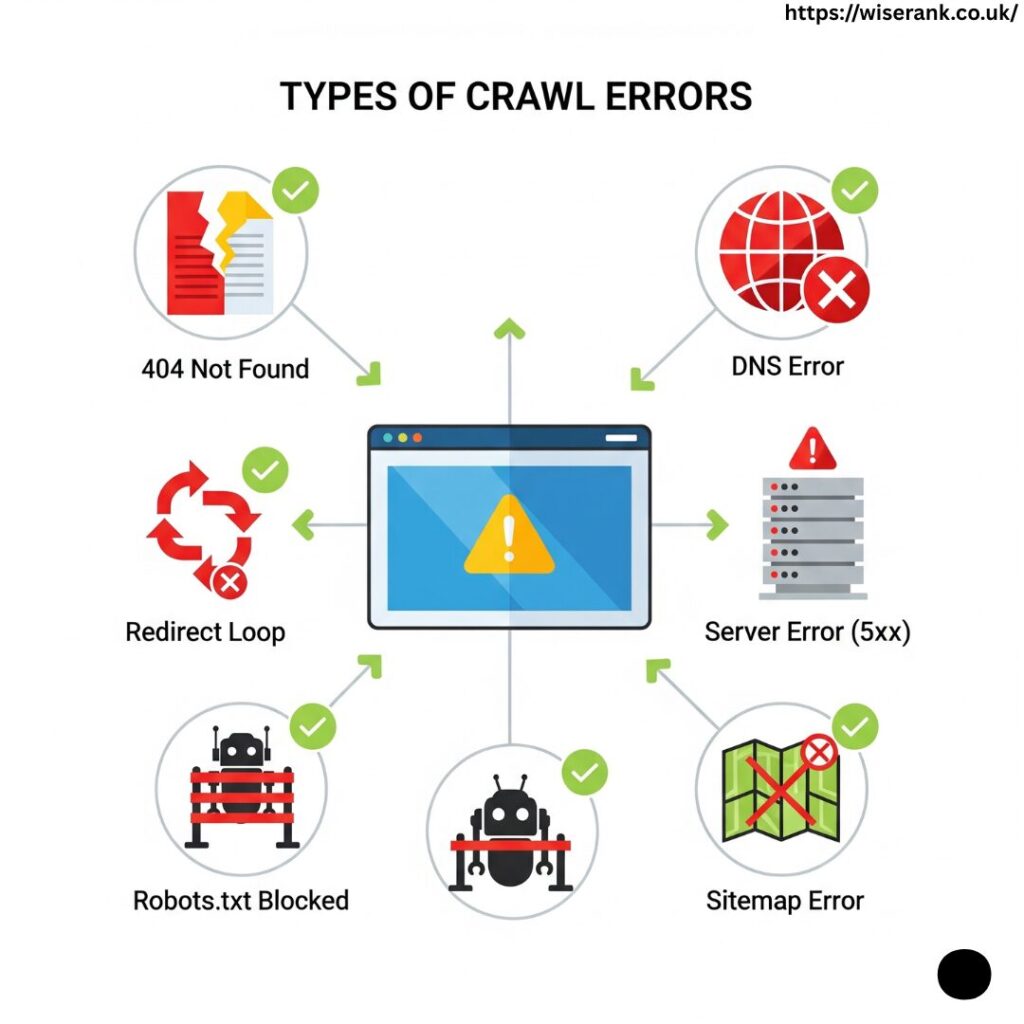
Here are the most common crawl errors you’ll see in Google Search Console (GSC) and how they impact your SEO:
1. DNS Errors
- Happen when Googlebot cannot communicate with your DNS server.
- Causes: DNS timeout, server misconfiguration.
- SEO Impact: Google won’t crawl your site, leading to indexing issues.
2. Server Errors (5xx)
- Happen when your server doesn’t return a proper response.
- Causes: Overloaded server, misconfigured hosting.
- SEO Impact: Crawl budget waste, pages drop from the index.
3. 404 Errors (Not Found)
- Occur when a page doesn’t exist.
- Causes: Broken links, deleted content, wrong URLs.
- SEO Impact: Poor user experience, wasted crawl budget.
4. Soft 404 Errors
- Page returns a “200 OK” status but actually shows a “Not Found” message.
- Causes: Thin content pages, poor redirects.
- SEO Impact: Google may ignore such pages.
5. Redirect Errors (301/302)
- Happens when redirects form a loop or lead to broken pages.
- Causes: Incorrect redirect chains.
- SEO Impact: Link equity loss, crawl inefficiency.
6. Robots.txt Errors
- Occur when important pages are blocked from crawling.
- Causes: Misconfigured robots.txt file.
- SEO Impact: Google can’t access and index blocked pages.
7. Sitemap Errors
- Errors inside your submitted XML sitemap.
- Causes: Outdated or incorrect URLs.
- SEO Impact: Google wastes crawl budget on invalid URLs.
How Crawl Errors Affect SEO?
- Indexing Problems – If crawlers can’t access a page, it won’t appear in search results.
- Crawl Budget Wastage – Google allocates limited crawl resources; errors waste them.
- Reduced Rankings – Broken links and server issues hurt user experience and SEO.
- Local SEO Impact – Crawl issues can prevent Google Business Profile (GBP) landing pages from ranking locally.
- E-commerce Impact – Product pages with crawl errors won’t be indexed, causing sales loss.
How Crawl Budget Works and Why It Matters for Large Websites?
Search engines do not crawl your website unlimited times. Google assigns a specific crawl budget, which is the number of pages Googlebot is willing to crawl within a certain time frame.
For small websites, crawl budget may not be a major issue. But for:
- E-commerce stores
- News websites
- Large service-based websites
- Multi-location businesses
Crawl budget becomes extremely important.
If your site has many crawl errors, Googlebot may waste its allocated budget on:
- Broken pages
- Duplicate URLs
- Parameter-based URLs
- Thin content pages
This means important pages may not get crawled or indexed quickly.
How to Optimise Crawl Budget
- Remove or redirect low-value pages
- Fix broken internal links
- Keep XML sitemaps clean and updated
- Avoid unnecessary redirect chains
- Use noindex on low-value filter pages
When crawl budget is used efficiently, important pages get indexed faster, and rankings improve more consistently.
How to Identify Crawl Errors?
Use these tools to detect crawl errors quickly:
- Google Search Console (Crawl Stats & Indexing Report)
- Shows crawl errors like server issues, 404s, and blocked resources.
- Screaming Frog SEO Spider
- Identifies redirect loops, broken links, and duplicate pages.
- Ahrefs Site Audit / SEMrush Site Audit
- Provides crawl error reports with SEO recommendations.
- Log File Analysis
- Helps understand how Googlebot crawls your website.
How to Fix Crawl Errors (Step-by-Step Solutions)?
🔹 Fixing DNS Errors
- Ensure your DNS server is reliable.
- Use a fast hosting provider with CDN (Content Delivery Network).
🔹 Fixing Server Errors (5xx)
- Upgrade to better hosting.
- Optimize database queries and reduce server load.
- Check server logs for issues.
🔹 Fixing 404 Errors
- Redirect broken pages (301 redirects) to the most relevant URL.
- Update internal and external broken links.
- Create a custom 404 page for better UX.
🔹 Fixing Soft 404 Errors
- Improve thin content pages with relevant content.
- Use correct HTTP status codes.
- Consolidate duplicate pages.
🔹 Fixing Redirect Errors
- Avoid redirect chains longer than 2 hops.
- Correct misconfigured 301/302 redirects.
- Regularly audit redirects with Screaming Frog.
🔹 Fixing Robots.txt Issues
- Ensure important pages are not blocked accidentally.
- Use
Disallowcarefully. - Test robots.txt in GSC’s robots tester tool.
🔹 Fixing Sitemap Errors
- Keep XML sitemaps updated.
- Remove invalid or non-canonical URLs.
- Submit sitemaps in Google Search Console.
When to Use 301 Redirect vs 410 Status Code?
When removing pages, choosing the correct status code is essential for SEO.
Use 301 Redirect When:
- A page has a replacement
- The content has moved permanently
- The page has backlinks
- You want to transfer link equity
Example:
If a service page URL changes, redirect old URL to the new one.
Use 410 Status Code When:
- A page is permanently removed
- There is no relevant replacement
- The content should not return
Example:
Expired promotional pages or permanently discontinued products.
Google removes 410 pages from the index faster than 404 pages. Using the correct status code improves crawl efficiency and keeps your website clean.
How to Prioritise Crawl Errors Based on SEO Impact
Not all crawl errors have the same impact on SEO. Fixing errors strategically saves time and improves results faster.
High Priority Errors (Fix Immediately)
- DNS errors
- Server errors (5xx)
- Errors affecting high-traffic pages
- Errors on pages with backlinks
These directly affect indexing and rankings.
Medium Priority Errors
- Important service pages are returning 404
- Key blog articles with internal links
- Redirect loops affect user experience
Low Priority Errors
- Old deleted blog URLs with no traffic
- Expired campaign pages
- Non-essential test URLs
How to Decide What to Fix First
- Check which pages generate revenue
- Identify pages ranking for important keywords
- Look at referral traffic and backlinks
- Review Google Search Console data
By prioritising correctly, you protect your most valuable SEO assets first.
How Internal Linking Helps Reduce Crawl Errors
Internal linking plays a major role in preventing crawl errors and improving crawl efficiency.
When your internal links are broken, Googlebot:
- Wastes crawl budget
- Encounters unnecessary 404 errors
- Struggles to discover important pages
Common Internal Linking Issues
- Broken links pointing to deleted pages
- Orphan pages (pages with no internal links)
- Incorrect redirect links
How to Fix Internal Linking Issues
- Audit internal links using Screaming Frog
- Update links when URLs change
- Ensure every important page has at least 2–3 internal links
- Link blog content to relevant service pages
A strong internal linking structure improves crawlability, indexing speed, and user experience.
Best Practices to Prevent Future Crawl Errors
- Monitor crawl stats in GSC regularly.
- Maintain clean internal linking structure.
- Optimize website speed (Google loves fast-loading pages).
- Use HTTPS for secure crawling and indexing.
- Fix duplicate content with canonical tags.
- Perform quarterly technical SEO audits.
Local SEO and Crawl Errors
For local businesses, crawl errors can:
- Prevent Google Business Profile landing pages from being indexed.
- Hurt local pack rankings if NAP (Name, Address, Phone) pages are blocked.
- Reduce organic local visibility in city-specific searches.
Fixing crawl errors ensures your local SEO strategy remains strong.
E-commerce SEO and Crawl Errors
For e-commerce sites, crawl errors can:
- Stop product pages from being indexed.
- Waste crawl budget on out-of-stock or parameter-based URLs.
- Hurt category and filter pages if robots.txt is misconfigured.
Solution:
- Use structured data for e-commerce products.
- Handle faceted navigation carefully.
- Regularly update sitemaps with fresh product URLs.
Why Choose WiseRank for Fixing Crawl Errors?
At WiseRank, we specialize in technical SEO audits and fixing crawl errors to maximize your website’s indexing and ranking potential.
Here’s why businesses choose us:
- Comprehensive Crawl Error Solutions – From DNS to 404s, we handle every issue.
- Advanced Tools & Expertise – We use Google Search Console, Screaming Frog, and log analysis.
- Custom Technical SEO Plans – Every website is different; we tailor solutions for you.
- Improved Indexing & Rankings – Clients see higher organic traffic after crawl fixes.
- Local & Ecommerce Focus – We understand the unique crawl issues faced by small businesses and online stores.
Fixing crawl errors is not just about cleaning reports — it’s about making your site fully crawlable, indexable, and SEO-friendly.
Final Thoughts
Crawl errors are inevitable, but leaving them unresolved can severely impact your SEO performance. By following this step-by-step guide to fixing crawl errors, you’ll ensure your website is:
- Crawlable by search engines
- Indexable with no wasted crawl budget
- SEO-optimized for better rankings
- User-friendly with fewer broken links and errors
Ready to eliminate crawl errors and improve your website’s performance? Partner with WiseRank, and let our experts handle the technical side of SEO while you focus on growing your business.


