A fast website is no longer just a nice feature — it is a vital ranking factor in how Google evaluates and ranks websites. Speed affects how users experience your site, how long they stay, and how likely they are to take action. In today’s competitive online world, a slow website can mean lost visitors, lower conversions, and poor visibility in search results.

Website Speed & seo

This guide explains how website speed impacts SEO, explores the main speed metrics Google uses, and outlines practical steps to improve your page load times for 2025 and beyond.

What Is Website Speed and Why It Matters?

Website speed refers to how quickly a web page loads and displays its content to users. Every second counts. Research by Google shows that when page load time increases from one second to three seconds, the probability of a visitor leaving rises by 32 percent.

A fast website ensures users can see and interact with your content quickly. This enhances engagement, boosts conversions, and signals to Google that your site offers a strong user experience — one of the most important SEO indicators today.

In short, speed influences both user satisfaction and search visibility. When your site loads slowly, visitors leave early, your bounce rate increases, and Google’s ranking systems take note.

How Website Speed Affects SEO Rankings?

Search engines aim to deliver the best results for users, and part of that involves providing websites that load fast. Google considers website speed a ranking factor because it directly relates to usability.

A slow site creates friction. When visitors abandon your site quickly, it sends a signal that your content or experience does not meet their needs. This reduces dwell time — the amount of time someone spends on your page — and lowers engagement metrics.

Here’s how speed connects with SEO ranking factors:

  • Crawlability: Search bots can crawl fewer pages if your website loads slowly.
  • Indexing: Delayed page responses affect how frequently your content is indexed.
  • User behavior: High bounce rates and low time-on-page suggest poor performance.
  • Page Experience: Google’s Core Web Vitals evaluate real-world performance signals that include loading speed and interactivity.

So, improving speed is not only about faster load times — it’s about improving the entire perception of your site’s quality and credibility.

Understanding Core Web Vitals

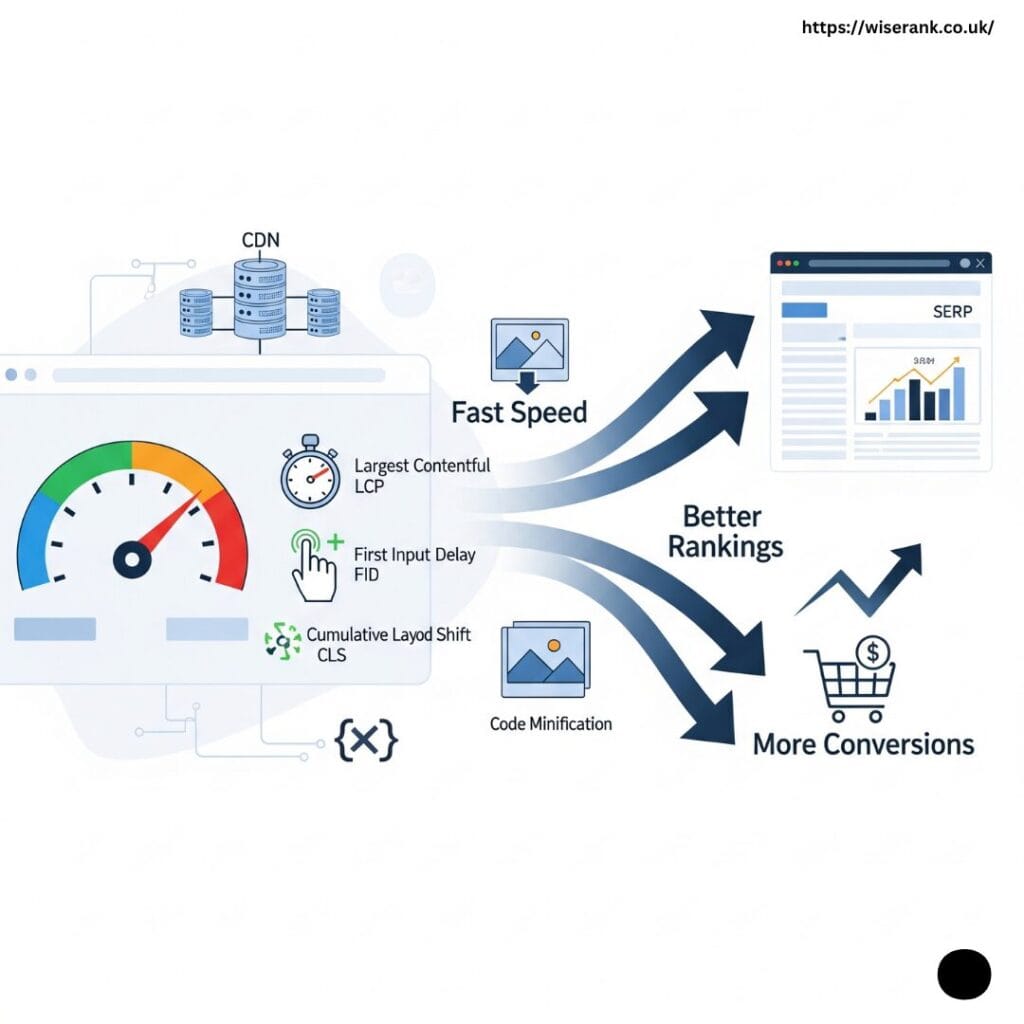
Google introduced Core Web Vitals to help measure real-world user experience. These metrics focus on how quickly a site loads, how responsive it feels, and how visually stable it remains while loading.

Largest Contentful Paint (LCP)

LCP measures how long it takes for the main content (such as an image or text block) to load.

  • Good: Less than 2.5 seconds
  • Needs Improvement: 2.5 to 4 seconds
  • Poor: Over 4 seconds

First Input Delay (FID)

FID measures the time it takes for your website to respond after a user first interacts with it (like clicking a button).

  • Good: Under 100 milliseconds

Cumulative Layout Shift (CLS)

CLS measures visual stability — how much elements move while loading.

  • Good: Below 0.1

Optimizing for these metrics means creating a smooth, responsive experience that visitors — and Google — value highly.

How Page Speed Influences User Experience?

Fast websites make visitors feel confident and engaged. Slow ones make them frustrated and impatient. The human attention span is short, and with millions of competing pages, users rarely wait more than a few seconds for a site to load.

A one-second delay can reduce conversions by up to 20 percent. This means if your site sells products or collects leads, even small performance issues can significantly affect revenue.

Moreover, mobile users, who often rely on slower networks, are more sensitive to delays. Optimizing for mobile speed ensures better user engagement, which improves both local and global SEO performance.

Key Technical Factors That Affect Site Speed

Several technical elements influence how fast your website loads. Understanding and optimizing these can dramatically improve performance.

How Website Speed Affect SEO

1. Server Response Time (TTFB)

TTFB measures how long your server takes to respond to a browser request. Hosting quality plays a major role here. Choose a reliable provider with global server locations for faster response times.

2. Browser Caching

Caching stores files locally in a user’s browser, allowing returning visitors to load pages faster. Proper cache settings can significantly reduce load times.

3. Image Optimization

Large, uncompressed images are among the most common causes of slow websites. Use tools to compress images and adopt formats like WebP or AVIF for better performance without sacrificing quality.

4. Minification of CSS, JavaScript, and HTML

Minifying code removes unnecessary characters, reducing file sizes. Smaller files load faster, improving both user and bot experience.

5. Content Delivery Network (CDN)

A CDN stores your site’s content on multiple servers around the world, delivering it from the closest location to the user. This reduces latency and ensures fast global performance.

6. Lazy Loading for Images and Videos

Lazy loading ensures that images or videos load only when they come into view, saving bandwidth and speeding up the initial page load.

Mobile Site Speed and SEO

Google’s mobile-first indexing means the mobile version of your site is what’s primarily considered for ranking. Therefore, your website must perform flawlessly on smaller screens.

A mobile-optimized site includes:

  • Lightweight designs that minimize load times
  • Tap-friendly navigation and buttons
  • Compressed media suited for mobile networks

Mobile speed is especially critical for local SEO, where users search for “near me” services. If your local business website loads slowly, it can lose visibility in the local pack and map results.

How to Measure and Improve Website Speed?

Regularly testing your website speed is essential for maintaining top performance. Several reliable tools help analyze speed metrics and suggest improvements.

1. Google PageSpeed Insights

Provides detailed Core Web Vitals data and actionable tips for both desktop and mobile versions.

2. Lighthouse

An open-source tool built into Chrome that measures performance, accessibility, and SEO.

3. GTmetrix and WebPageTest

These tools offer deeper analysis with waterfall charts that show which elements slow down your site.

4. Chrome DevTools

Allows you to test loading performance, network requests, and script execution in real-time.

Use these tools to identify bottlenecks, optimize scripts, and track progress after changes.

How Website Speed Impacts Conversions and Local Rankings?

Speed affects more than SEO rankings — it also influences user trust and business results.

  • Better conversions: A faster checkout or form process leads to higher sales and leads.
  • Improved engagement: Visitors stay longer and explore more pages when the site feels responsive.
  • Enhanced local visibility: Google prioritizes fast, mobile-friendly websites for local searches, giving small businesses a competitive edge.

For example, a UK-based retailer improved its average page load from 4.2 seconds to 1.9 seconds and saw a 17 percent increase in online sales. That’s how real speed improvements translate into measurable outcomes.

Best Practices to Optimize Website Speed

You can improve speed through a combination of technical fixes and smart design decisions.

Simplify and Streamline Your Website

Remove unnecessary plugins, heavy themes, and outdated code. A leaner site loads faster and performs more reliably.

Enable Compression

Use compression tools such as Gzip or Brotli to reduce file size.

Prioritize Above-the-Fold Content

Ensure that visible content loads first, so users can interact immediately while other elements load in the background.

Reduce Redirects

Each redirect adds extra time to the loading process. Keep them minimal and update links when possible.

Monitor Performance Regularly

Speed issues often reappear after new updates or design changes. Use Google Analytics or Search Console to watch for sudden load time increases.

The Connection Between Site Speed and Core Web Vitals

Core Web Vitals directly affect rankings, and each metric reflects a different aspect of speed and usability.

Improving LCP can be achieved through faster server responses and optimized images. Enhancing FID requires reducing heavy JavaScript and prioritizing interactivity. Lowering CLS depends on stabilizing layout shifts by specifying image dimensions and avoiding dynamic content above the fold.

Focusing on these three ensures that your site aligns with Google’s performance expectations and keeps users engaged.


The Role of Speed in Local SEO

For local businesses, speed is even more crucial. A fast site can increase visibility in Google Maps, Local Pack results, and “near me” searches.

Local users expect instant results, and Google rewards websites that meet this expectation. Optimizing your server location, caching, and mobile performance improves not just rankings but also customer satisfaction in your service area.

Monitoring Website Speed Over Time

Website speed is not a one-time fix but a continuous part of maintaining strong SEO performance. As websites grow, new updates, plugins, and media files can slow them down. Regular monitoring ensures your site remains fast, reliable, and aligned with Google’s performance standards.

1. Schedule Regular Speed Audits

Plan speed audits every few months to identify slow pages or new performance issues. Over time, website updates, design changes, or added plugins can reduce efficiency. Frequent checks help you catch these problems early before they affect rankings or user experience.

2. Use Trusted Speed Testing Tools

Rely on reliable tools such as Google PageSpeed Insights, Lighthouse, GTmetrix, and WebPageTest to measure page load times and track Core Web Vitals. These tools reveal which resources slow your site and offer suggestions for improvement. Consistent tracking ensures your site stays below the three-second load time benchmark.

3. Maintain Long-Term Performance Habits

Speed monitoring should become a routine part of your SEO process. Keep your website lightweight by cleaning unused files, optimizing images, and reviewing server performance regularly. Continuous attention to performance helps your site stay fast, enhance user satisfaction, and maintain a competitive edge in search rankings.

Common Website Speed Mistakes That Hurt SEO

Many websites lose valuable traffic because of simple performance mistakes that slow them down. These errors not only frustrate visitors but also harm rankings and conversions. Avoiding them can protect your SEO results and improve user satisfaction.

Common mistakes that reduce website speed and SEO performance include:

  • Using uncompressed or oversized images that take too long to load.
  • Installing too many plugins or third-party scripts that increase page weight.
  • Ignoring mobile optimization, causing slow load times on smartphones and tablets.
  • Using heavy themes, sliders, or auto-play videos that consume bandwidth unnecessarily.
  • Failing to clean up unused CSS, JavaScript, or outdated code.
  • Neglecting to test page speed after site updates or redesigns.
  • Hosting on low-quality servers with limited processing capacity or high latency.
  • Skipping browser caching and compression setup, forcing pages to reload from scratch each visit.

Each of these issues can slow down how quickly users and search engines access your content. Regular speed audits help you identify these mistakes early and maintain a site that loads fast, performs efficiently, and ranks higher in search results.

The Future of Website Speed and SEO in 2025

Search engines continue to evolve, and by 2025, website speed will become even more critical in how Google ranks and evaluates online experiences. New technologies, user expectations, and performance standards are reshaping how websites must perform to stay competitive.

1. Rising Importance of User Experience Metrics

Google’s algorithms are moving beyond simple load times to assess real-world interactivity. Metrics like Interaction to Next Paint (INP) are replacing older measures such as FID, offering a more complete view of how users experience your website. Sites that respond faster to user input will earn stronger rankings.

2. Faster Networks and Edge Computing

With the global rollout of 5G networks and advances in edge computing, web users now expect near-instant load times. Businesses that optimize their servers, use Content Delivery Networks (CDNs), and adopt next-generation caching will maintain performance standards that match these faster technologies.

3. AI-Driven Performance Optimization

Artificial intelligence is transforming technical SEO. AI-based systems are beginning to analyze real-time user behavior, detect slowdowns, and suggest automatic improvements to layout, resource delivery, and caching. This predictive optimization helps businesses prevent speed issues before they affect rankings.

4. Continuous Monitoring for Competitive Advantage

By 2025, consistent speed tracking will be an essential part of every SEO strategy. Companies that monitor Core Web Vitals, fix small delays early, and maintain a fast, stable experience across all devices will stand out to both users and search engines.

In the future, speed will not just be a ranking factor — it will be a key indicator of overall website quality, user trust, and digital credibility.

Conclusion

Website speed plays a vital role in every aspect of SEO — from rankings to user trust and conversion rates. Fast-loading pages not only help your site perform better in search results but also create lasting impressions that encourage visitors to stay and engage.

By following best practices like optimizing images, leveraging caching, improving Core Web Vitals, and using CDNs, you can ensure your website delivers the fast, seamless experience modern users expect.

A faster site means a stronger brand, better rankings, and a more successful business in 2025 and beyond.

Similar Posts

Leave a Reply

Your email address will not be published. Required fields are marked *